Whiteout Survival · Alliance Event
CANYON CLASH
R4/R5 Organization + Player Guide
A complete guide for R4/R5 officers and participating players. Learn how registration works, how to prepare your Legions, how to manage Fuel and Guardians, and how to fight as one organized team.
Live-panel ruleAlways follow the active in-game timer and current event help before registration or battle.
Official Event Rules
Overview
Event timing:
Event dates and registration stages may differ between states or event editions. Always follow the active in-game timer.
Official rule summary
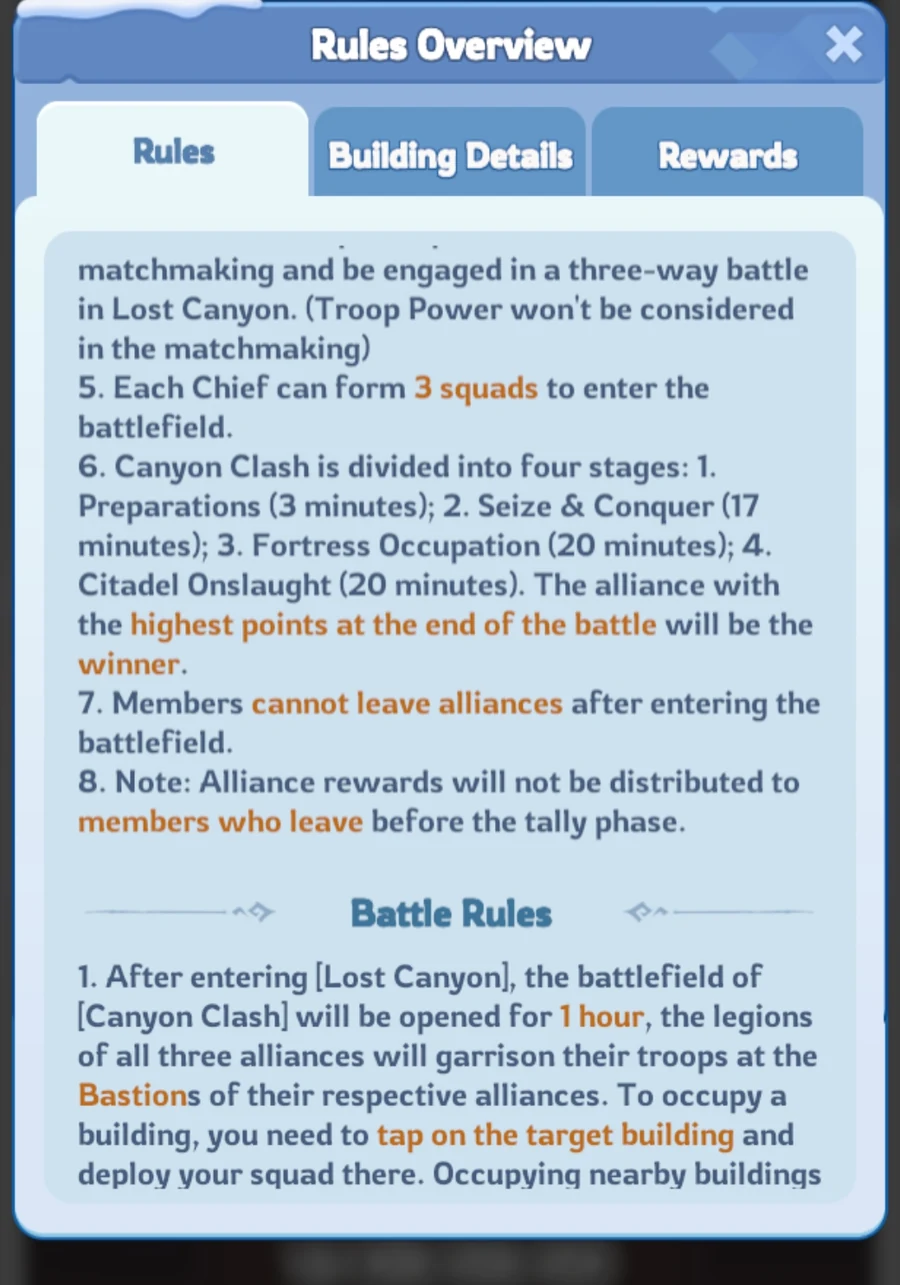
An alliance can register a maximum of two Legions. Each Legion has a separate battlefield and result. Personal rewards are calculated separately for each Legion, while Alliance Ranking Rewards depend on Legion 1.
What Is Canyon Clash?
Canyon Clash is a monthly alliance battlefield event.
Three alliances enter one map and compete for buildings, routes, Fortresses and the Frozen Citadel. Alliances earn points by capturing and holding objectives. The alliance with the highest final score wins.
Each alliance starts in one of three faction areas:
- Stormrage in the upper-left area,
- Flameguard in the upper-right area,
- Iceguard at the bottom.
Canyon Clash is separate from normal combat on the world map. The event uses copies of your real troops. Troops defeated inside Canyon Clash are not removed from your actual army.
You may also participate while some of your real troops are in the Infirmary or Enlistment Office.
INT practical recommendation
The Main Lesson
Canyon Clash is not won by random attacks.
A successful alliance:
- follows one clear plan,
- protects important routes,
- keeps useful buildings occupied,
- manages Fuel carefully,
- communicates quickly,
- reacts together when the map changes.
In-game screens · State 4272
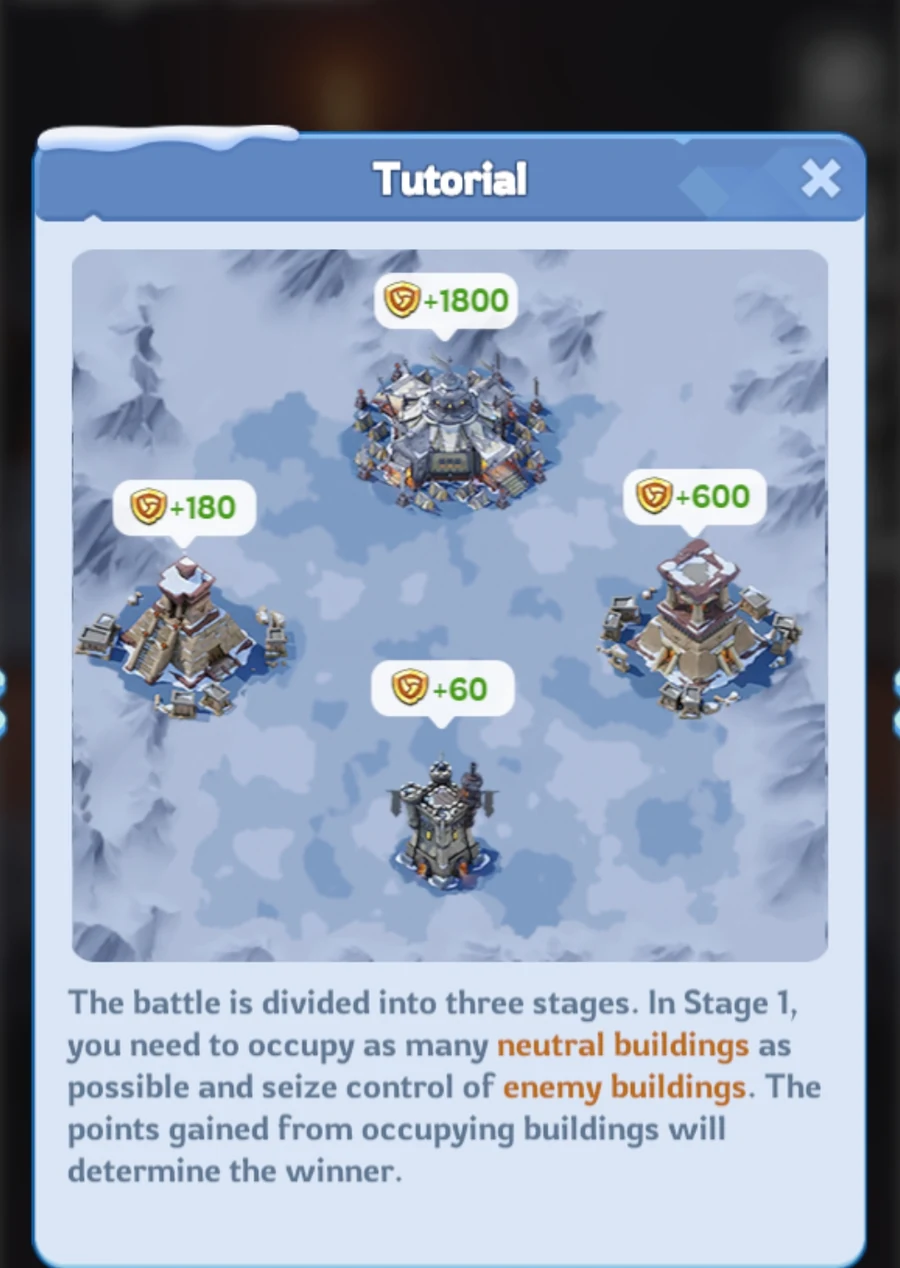
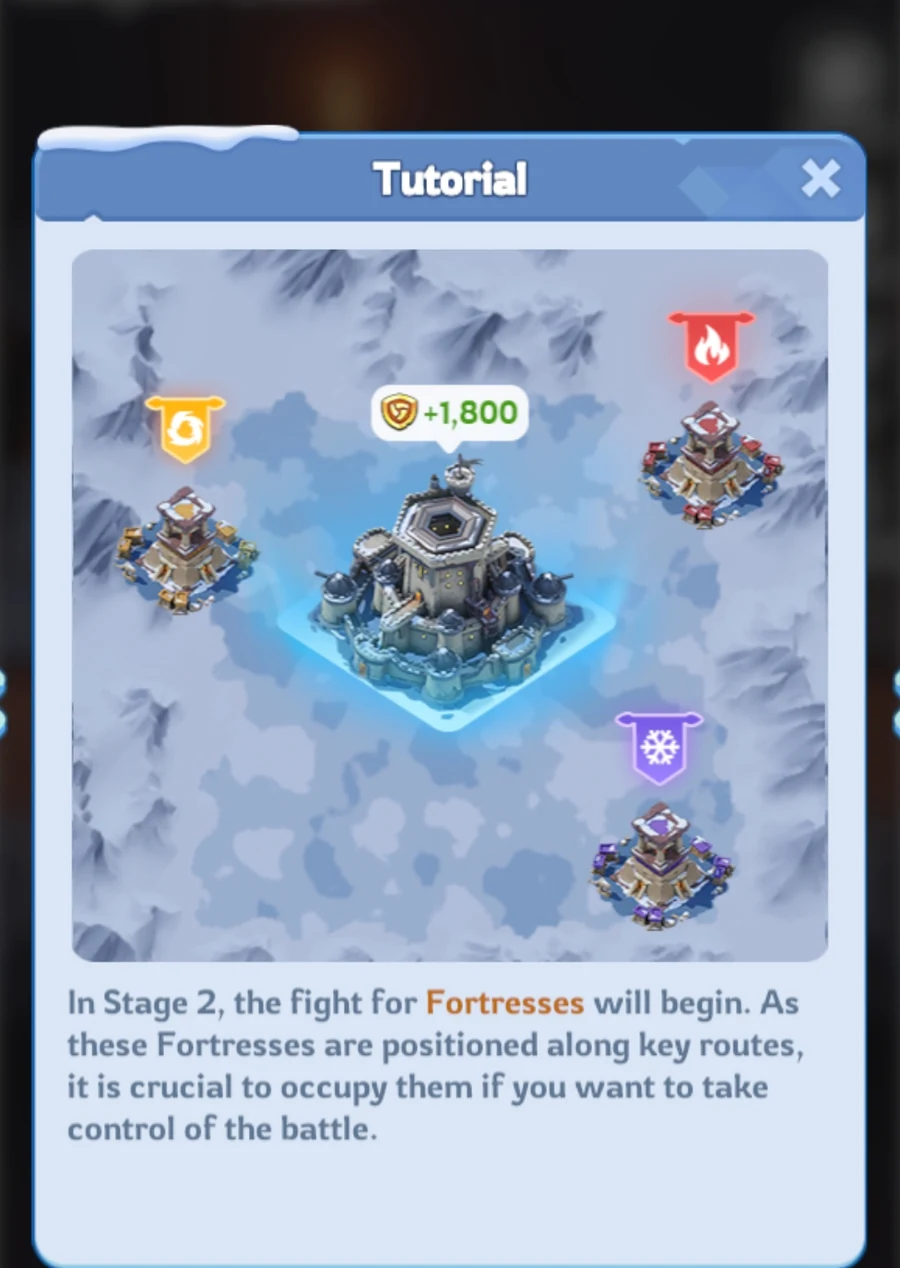
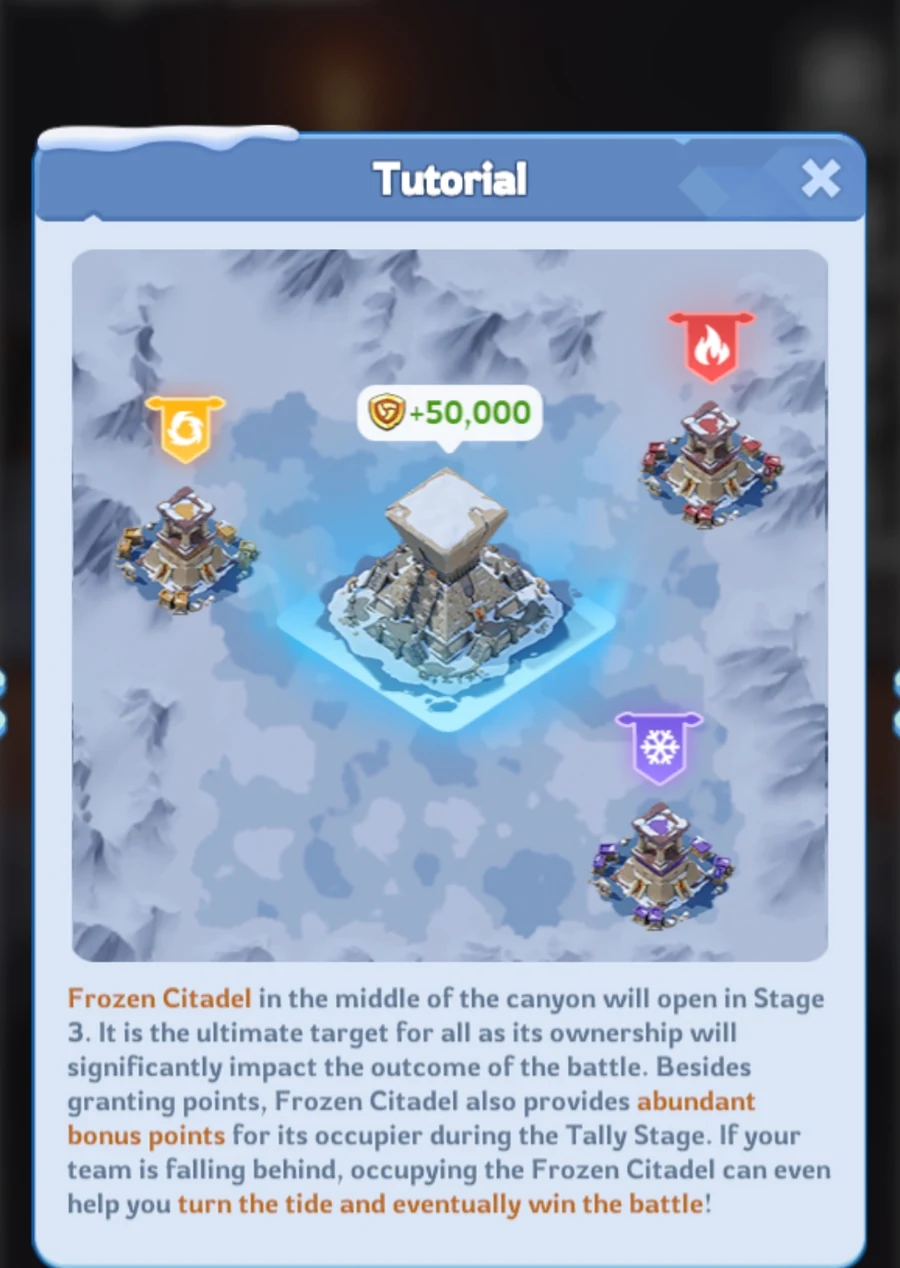
Tap or click a screenshot to open the larger image.
Official Event Process
Event Process
Voting
Alliance members vote for their preferred battle time.
The vote is not the final decision. R4/R5 officers select the final time slot.
Registration
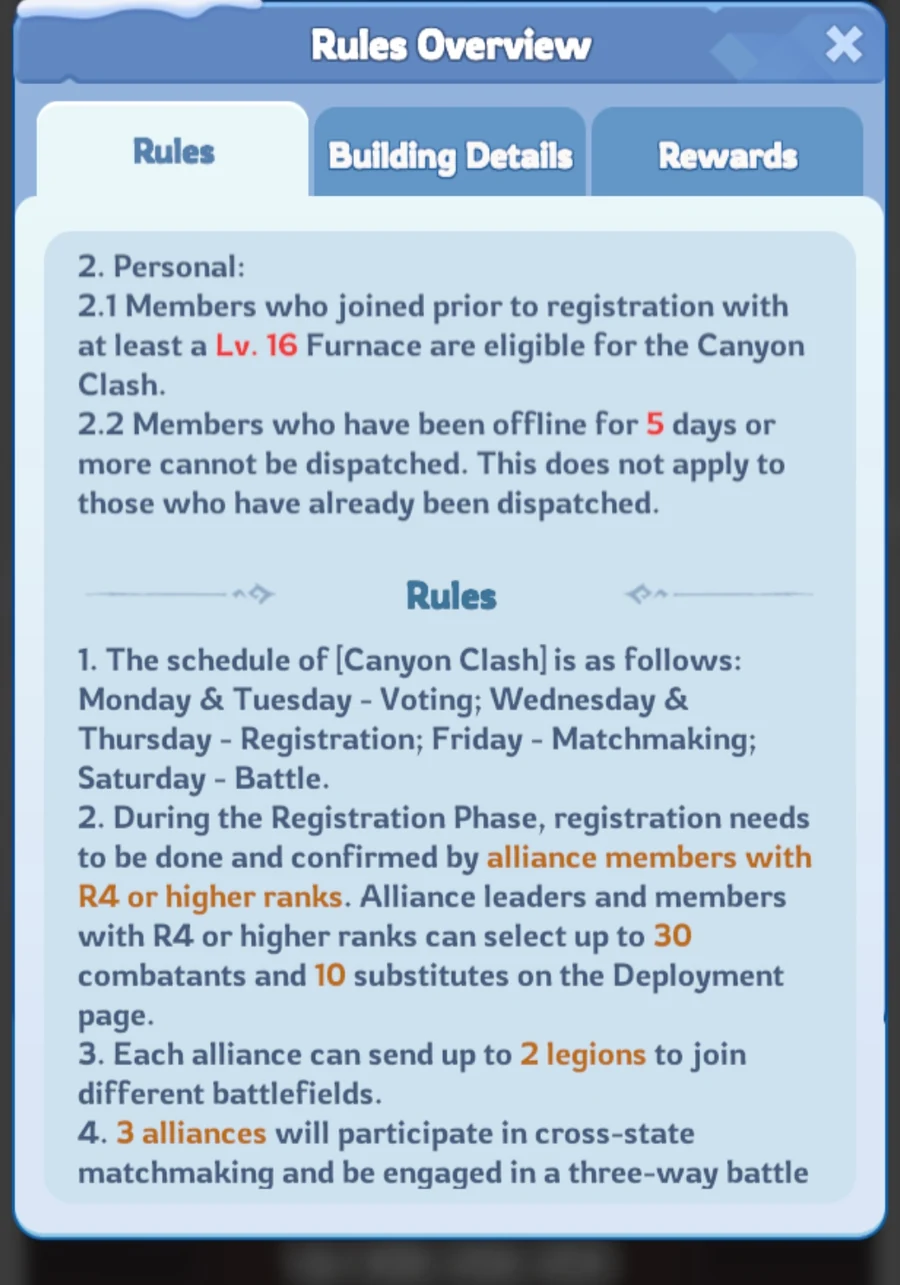
R4/R5 selects combatants and substitutes for each Legion.
Before registration closes, officers should confirm:
- the final battle time,
- the active player list,
- Legion assignments,
- the command team,
- the communication channel.
Matchmaking
Each qualified Legion is matched with two opposing alliances.
Substitutes are included in matchmaking. Check the current event help for detailed matchmaking rules.
Battle and Results
The battlefield lasts 60 minutes and has four phases.
After the battle, rewards are calculated from alliance ranking, individual ranking and Personal Merits.
Official Eligibility Rules
Eligibility and Registration
Alliance Requirements
To participate, an alliance must:
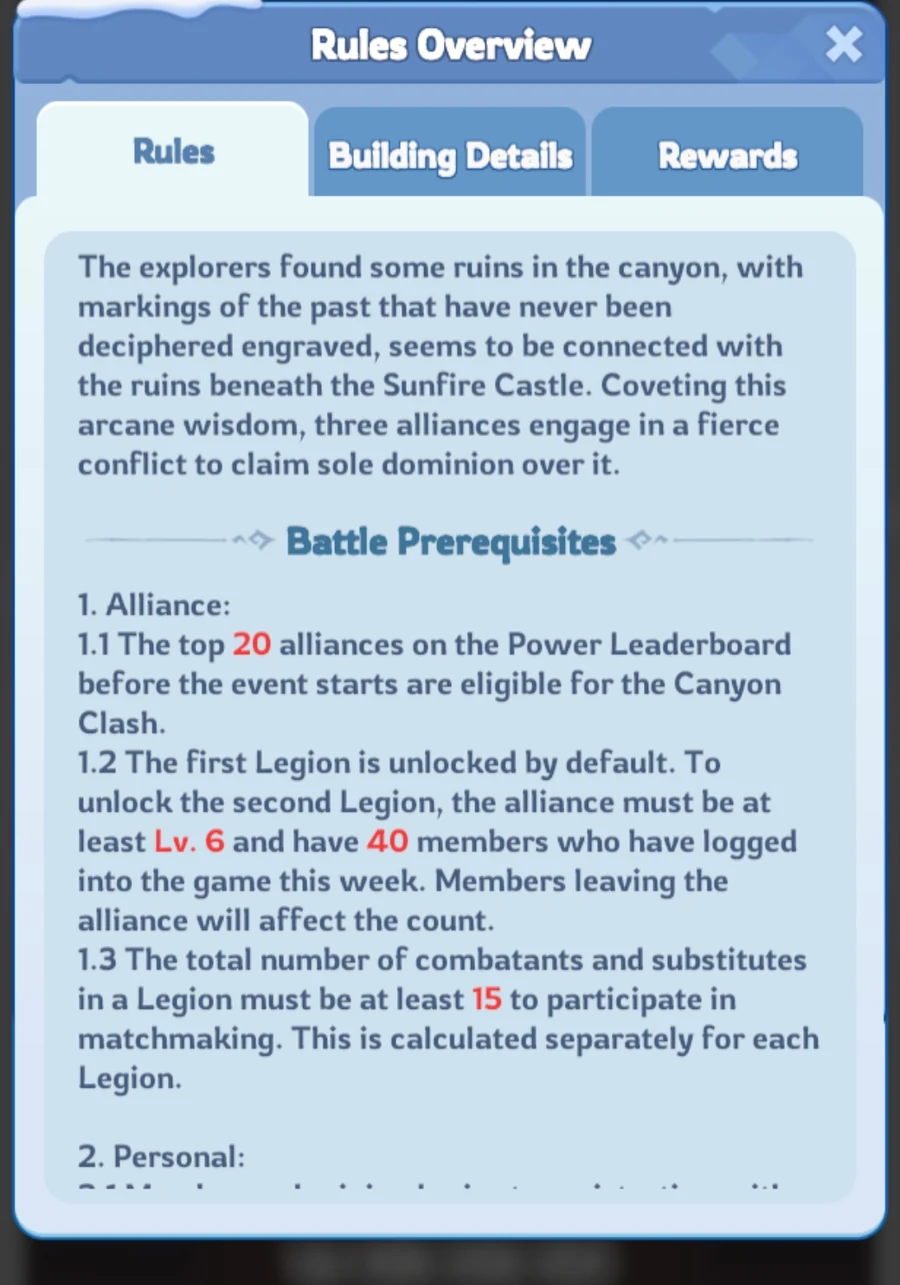
- be in the top 20 of the Alliance Power Leaderboard,
- register at least 15 combatants and substitutes in total for each Legion,
- complete registration before the deadline.
Legion 1 is available by default.
To unlock Legion 2, the alliance needs:
- Alliance Level 6 or higher,
- at least 40 members who logged in during the current week.
An alliance can register no more than two Legions.
Legion 1 and Legion 2 may select different battle time slots. Their battles, results and rewards are calculated separately.
Player Requirements
A player must:
- join the alliance before the Registration Phase,
- have Furnace Level 16 or higher,
- meet the current activity requirements,
- be selected by R4/R5.
A member who has been offline for five days or more cannot normally be selected unless that player was already dispatched before becoming inactive.
For one Legion, R4/R5 can select up to:
- 30 combatants,
- 10 substitutes.
Combatants and Substitutes
Combatants are the main registered participants.
Substitutes are registered reserve participants and are also included in matchmaking.
Matchmaking power: Matchmaking uses the combined Troop Power of the 20 strongest Chiefs among combatants and substitutes. The number of registered participants itself does not affect the matchmaking result.
INT recommendation: Do not add a very strong but unavailable player as a substitute without considering the possible matchmaking impact.
R4/R5 should not choose players only because they have high power. Attendance, communication and willingness to follow instructions are also important.
In-game screens · State 4272
INT Practical Recommendations
INT Organization Guide for R4/R5
The following section contains practical INT recommendations. It is not an additional list of official game rules.
INT recommendation
Choose the Battle Time
Do not rely only on the in-game vote.
Before selecting the final time:
- Ask members when they can really attend.
- Check the time zones of active players.
- Confirm that the Main Commander and supporting R4 officers are available.
- Select the time with the strongest realistic attendance.
- Announce the final time clearly.
Use short messages that are easy to translate.
Canyon Clash final time: 18:00 UTC.
Confirm only if you can join the full battle.
Build Legion 1
Legion 1 should receive the strongest reliable roster because Alliance Ranking Rewards depend only on Legion 1’s final ranking.
Prioritize:
- players who confirmed attendance,
- active R4/R5 officers,
- players who follow map marks,
- players with stable connections,
- players who can stay for the full battle.
Build Legion 2
Create Legion 2 only when it has:
- enough active participants,
- a clear commander,
- enough support players,
- a working communication plan.
One organized Legion is better than two badly prepared Legions.
Assign Command Roles
Main Commander
Makes the final strategic decisions.
The Main Commander decides:
- the opening plan,
- when to attack or defend,
- when to change routes,
- when to focus on Fortresses,
- how many squads should move toward the Frozen Citadel.
Left-Side Commander
Controls the left route and nearby objectives.
Reports:
- enemy movement,
- empty buildings,
- weak defensive queues,
- requests for support.
Right-Side Commander
Controls the right route and nearby objectives.
This role has the same responsibilities on the opposite side of the map.
Fuel and Guardian Coordinator
Controls Guardian assignments and monitors Fuel needs.
This officer should:
- assign Guardians to useful buildings,
- move the role when another player needs the bonus,
- avoid leaving it on an inactive player,
- remind the Legion to save Fuel.
Map Observer
Watches the full battlefield.
The Map Observer warns the team when:
- an enemy alliance changes direction,
- a route becomes unprotected,
- the third alliance attacks an exposed building,
- too many friendly squads gather at one objective.
Short communication commands
Prepare Communication
Use short commands.
LEFT — DEFEND
RIGHT — MOVE TO MARK
FORTRESS — HOLD
CITADEL — ASSIGNED PLAYERS ONLY
SAVE FUEL
RETURN TO DEFENSE
DO NOT MOVE
WAIT FOR MARK
ENEMY MOVING LEFT
NEED SUPPORT RIGHT
One person should issue the main strategic orders. Other officers should support the same plan.
Opening Plan
The opening plan should define:
- the first neutral buildings,
- left and right routes,
- which players move first,
- which players remain as support,
- where the strongest squads are needed.
Backup Plan
The backup plan should explain what to do against a much stronger opponent.
Possible responses include:
- defend the safest route,
- stop repeated attacks on an impossible target,
- score against the less protected alliance,
- protect several useful buildings,
- preserve Fuel for the final phase.
Official Battle Rules
Core Battle Mechanics
Fuel
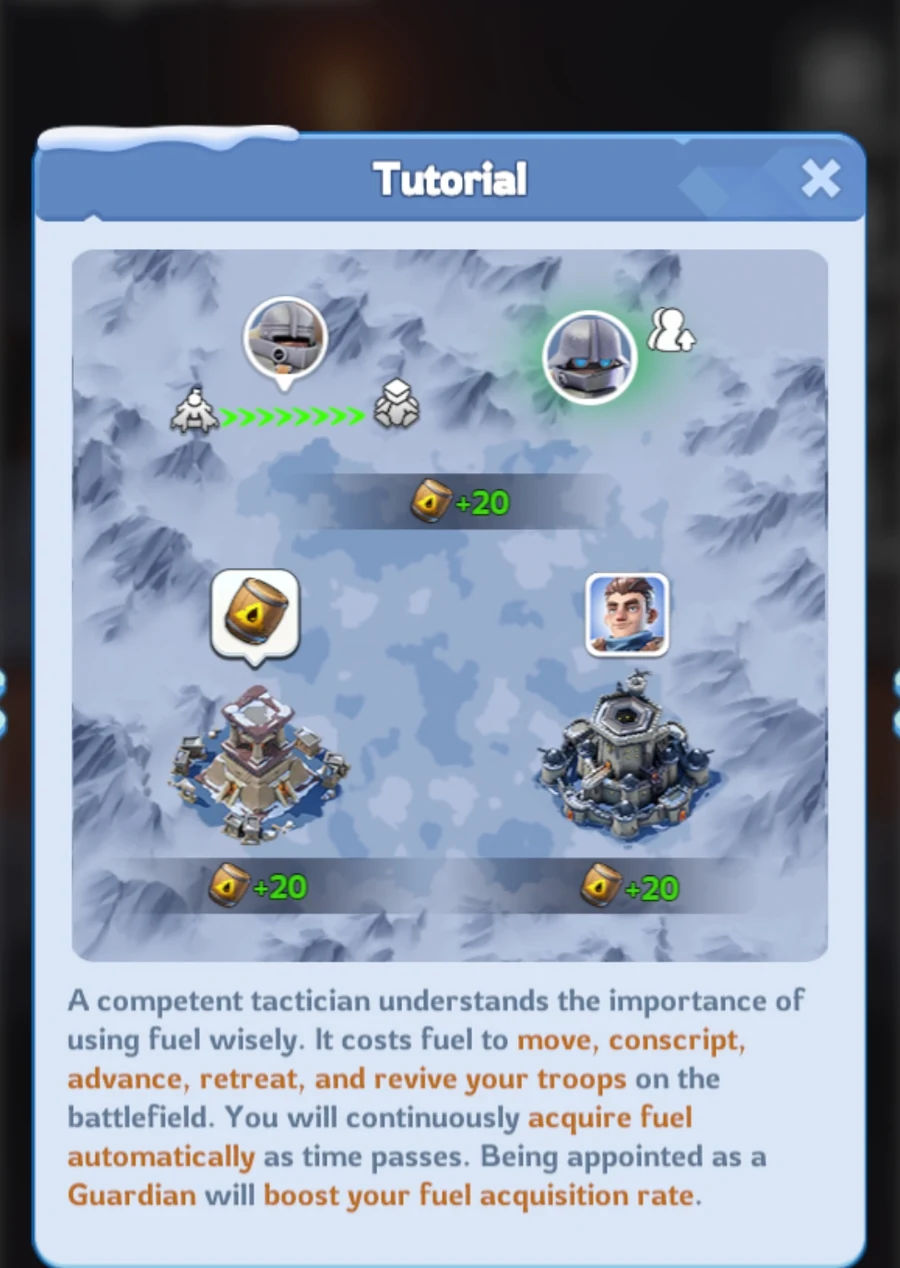
Fuel is the main action resource in Canyon Clash.
It recovers naturally every minute.
Fuel is used for actions such as:
- deploying squads,
- moving between objectives,
- advancing or retreating,
- conscripting troops,
- reviving defeated squads immediately.
Longer routes require more time and Fuel.
Attacking buildings inside another faction’s area requires additional Fuel.
Save Fuel for Key Moments
Do not spend all your Fuel at the beginning.
Keep a reserve for:
- urgent defense,
- Fortress battles,
- the Frozen Citadel phase,
- instant revival when a squad is urgently needed,
- emergency movement ordered by R4.
Guardians
R4/R5 officers can appoint a Guardian for an occupied building.
A player with a squad stationed inside the building can also appoint themselves.
A Guardian receives additional Fuel every minute. Different buildings may provide different Fuel bonuses.
One player can be the Guardian of only one building at a time.
Guardian status and its Fuel bonus are removed when:
- the alliance loses the building,
- the player leaves the battlefield,
- the assignment is changed.
Guardian status is not restored automatically after returning to the battlefield.
Manage Guardian Assignments
Guardian assignments should be managed actively.
Change the Guardian when:
- another player needs the Fuel bonus,
- the current Guardian leaves the area,
- the current Guardian becomes inactive,
- the building is no longer important,
- the alliance is preparing for a major movement.
Building Battles and Queues
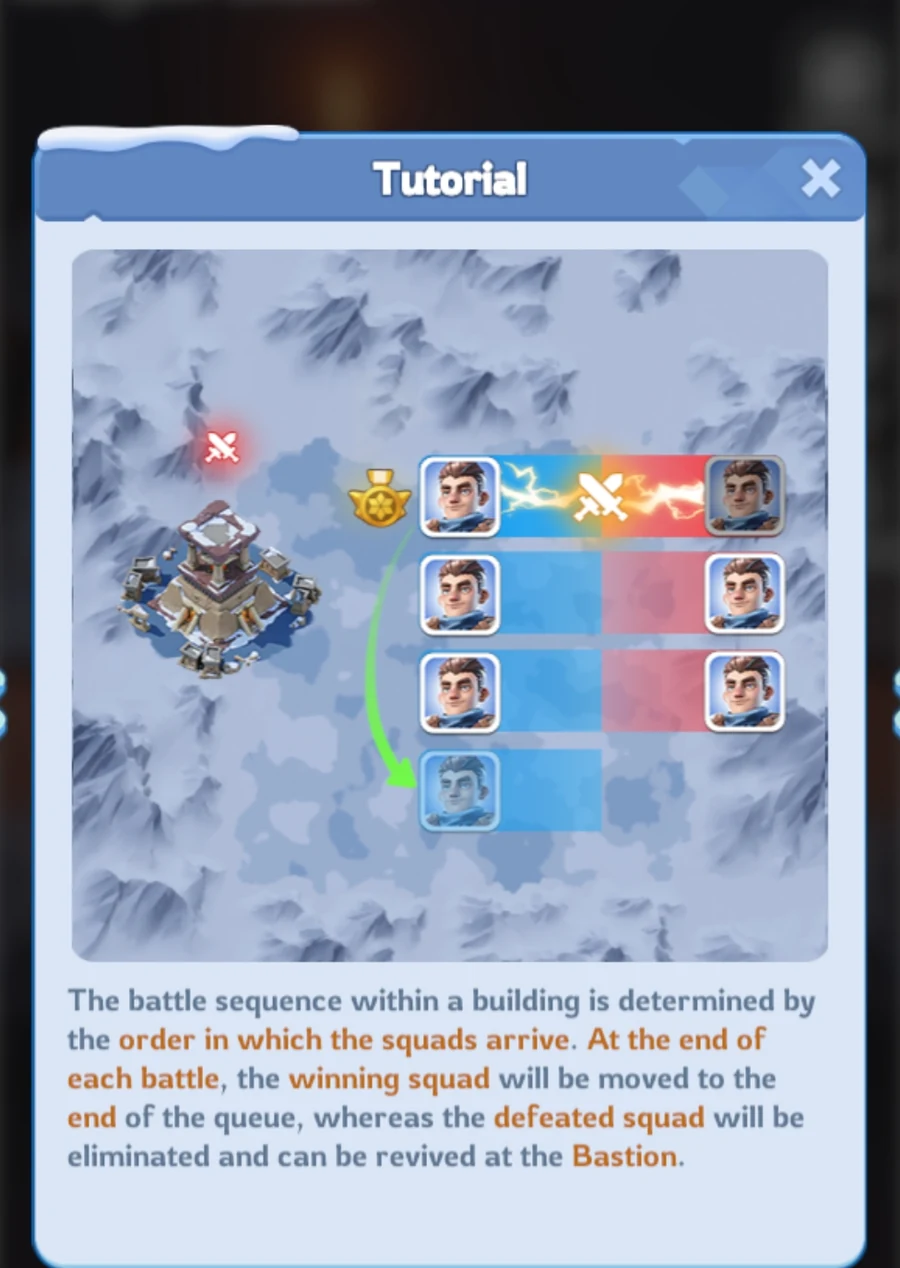
Squads fight for buildings one at a time.
The order is based on arrival.
When a squad wins, it returns to the end of its side’s queue.
When a squad loses, it leaves the fight and begins revival at the Bastion.
The Legion that defeats the final defending squad takes control of the building.
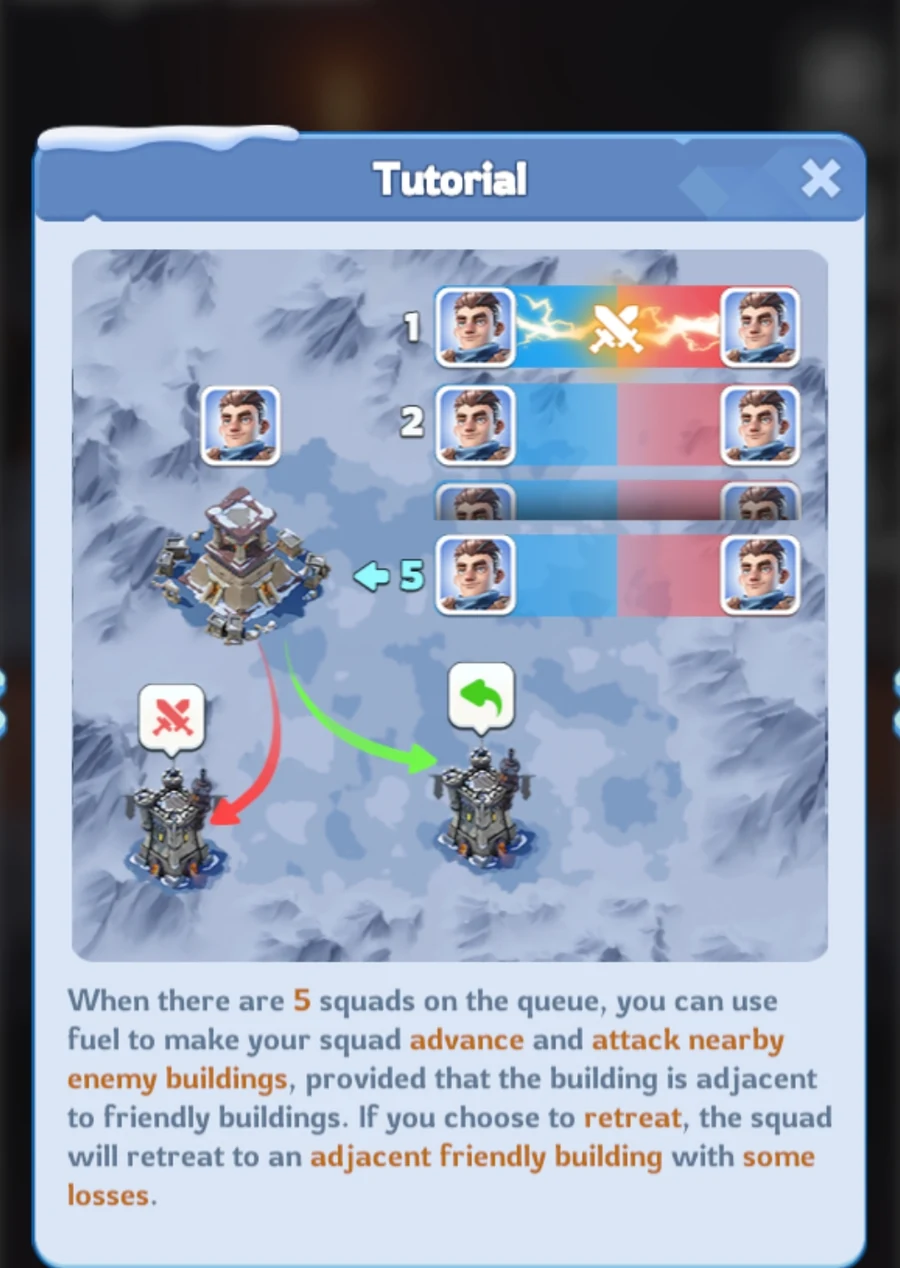
When a queue is large enough, special movement actions become available:
- Advance moves a squad toward an adjacent non-friendly building.
- Retreat moves a squad toward an adjacent friendly building.
Retreat is not available when there is no connected friendly building.
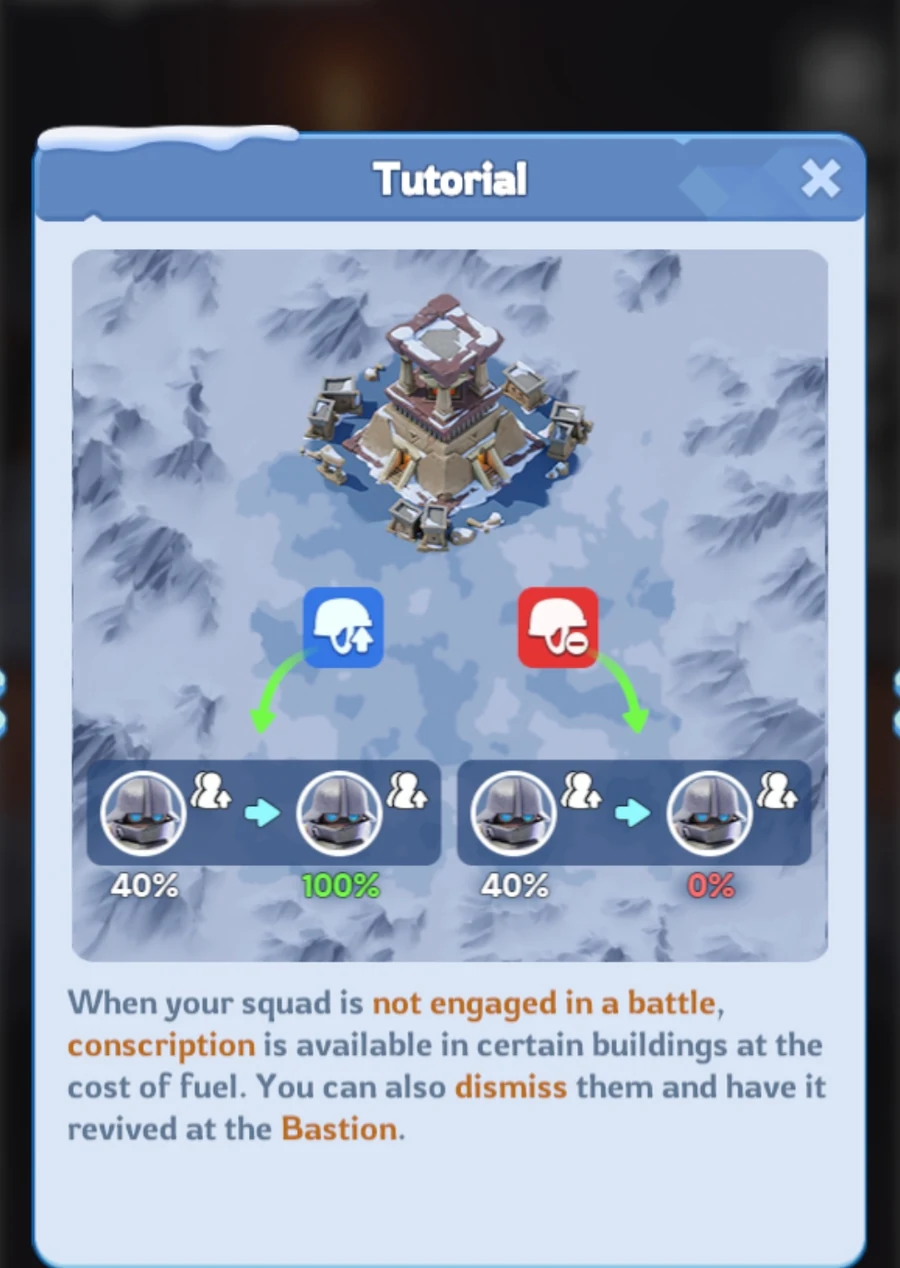
Dismiss
Dismiss removes the troops from the selected event squad and sends the squad to the Bastion for revival.
Use it only when there is a clear tactical reason. The squad will become temporarily unavailable.
Revival
A defeated squad revives at the Bastion after a countdown.
Fuel can be used for instant revival.
Do not use instant revival automatically after every defeat.
Use it when the squad is urgently needed for:
- defending a threatened building,
- a Fortress battle,
- the Frozen Citadel,
- a final score push.
Conscript
Conscript replenishes troops lost by an event squad.
It can be used only when the squad is stationed inside a building that is not currently in combat.
Conscript uses Fuel and event replenishment items.
Remember that Canyon Clash uses copies of your real troops. Event losses do not remove troops from your actual army.
Confirmed Buffs That Work
- Position Buffs,
- Pet Buffs,
- Territory Buffs,
- combat-related City Buffs,
- Facility Buffs.
Faction-region buildings may also provide bonuses to friendly alliance members and penalties to invading enemies.
The Bastion does not provide these faction-building effects.
Confirmed Buffs That Do Not Work
- March Speed,
- Deployment Capacity.
In-game screens · State 4272
Confirmed State 4272 Timings
Battle Plan by Phase
3 min
Phase 1 — Preparation
- enter the battlefield,
- create three squads,
- check your assigned side,
- read the first map marks,
- confirm the command structure,
- prepare Guardian assignments.
Do not move randomly before the plan is clear.
17 min
Phase 2 — Seize and Conquer
- capture neutral buildings,
- open useful routes,
- protect connections between objectives,
- place strong squads at important contested points,
- avoid leaving captured buildings empty.
Fast expansion is useful only when the alliance can defend what it captures.
20 min
Phase 3 — Fortress Occupation
Fortresses become the main focus.
Do not send the entire Legion to one Fortress.
Maintain:
- at least one protected route,
- defenders in important buildings,
- support for both sides,
- awareness of the third alliance.
A Fortress is valuable, but losing the rest of the map may cost more than the Fortress provides.
20 min
Phase 4 — Citadel Onslaught
The Frozen Citadel becomes the central objective.
The Citadel can strongly affect the final result, but it should not automatically receive every squad.
The Main Commander should decide:
- who attacks the Citadel,
- who supports the route,
- who protects existing buildings,
- when to use saved Fuel,
- when to stop an unsuccessful attack.
The final minutes may be decided by movement, timing and defense rather than raw power alone.
Player Preparation and Team Discipline
Player Guide
Before the Battle
- Confirm the final battle time.
- Convert it correctly to your local time.
- Enter several minutes early.
- Prepare three strong, complete squads.
- Read your assigned side or role.
- Open the agreed communication channel.
- Make sure your connection is stable.
- Use only buffs that work in Canyon Clash.
During the Battle
Follow Marks: Move toward the objective selected by R4. Do not start a private attack because a nearby building looks weak.
Save Fuel: Avoid unnecessary movement and instant revival.
Fill Useful Queues: A weaker squad can still delay an enemy, protect an empty building, strengthen a defensive queue or keep a route open.
Protect the Map: Do not move all three squads to the same target unless ordered. A Legion needs players who attack, defend and support.
Short player reports
Report Problems Briefly
NO FUEL
SQUAD REVIVING
ENEMY LEFT
RIGHT NEEDS HELP
BUILDING EMPTY
CANNOT MOVE
Important
Avoid These Mistakes
- attacking without orders,
- moving every squad to the Frozen Citadel,
- spending all Fuel early,
- leaving captured buildings empty,
- ignoring the third alliance,
- arguing about command decisions during the battle,
- leaving the battlefield without a serious reason.
Leaving the Battlefield
Leaving an active battlefield starts a 12-minute cooldown before you can return.
Going offline or losing connection does not automatically remove you from the battlefield. After reconnecting, you return to the same ongoing battle.
After entering the battlefield, you cannot leave the alliance.
Leaving the battlefield also removes Guardian status and its Fuel bonus.
R4/R5 Checklist
- Confirm the final battle time.
- Confirm real attendance.
- Complete Legion registration.
- Check the minimum roster requirement.
- Assign the Main Commander.
- Assign left and right commanders.
- Assign a Fuel and Guardian Coordinator.
- Prepare Plan A and Plan B.
- Announce the communication channel.
- Remind players to enter early.
- Confirm the opening routes.
- Keep Legion 1 as the priority roster.
Player Checklist
- Check the final time.
- Enter early.
- Prepare three squads.
- Read your assignment.
- Open the agreed communication channel.
- Follow marks.
- Save Fuel.
- Report problems briefly.
- Do not attack alone.
- Do not leave important buildings empty.
- Stay until the battle ends whenever possible.
Official Reward Rules
Rewards and Canyon Shop
Alliance Ranking Rewards
Alliance Ranking Rewards depend only on Legion 1’s final ranking.
Legion 2 has its own result, but it does not determine the alliance-wide ranking reward.
Personal Ranking Rewards
Personal Ranking Rewards are calculated separately for Legion 1 and Legion 2.
A player must reach at least 10,000 Personal Merits to qualify for Personal Ranking Rewards.
Personal Merit Rewards
Personal Merit Rewards depend on:
- the player’s Personal Merit total,
- the final ranking of that player’s Legion.
Exact reward items and quantities are not listed because they may change with event editions or server development.
Canyon Shop
Canyon Shop items refresh every two weeks.
Before spending event currency:
- review the full shop,
- check purchase limits,
- compare items with your current account needs,
- spend currency before any displayed expiry date.
This guide does not list permanent prices or guaranteed shop items because the selection may change.
Quick Answers
Frequently Asked Questions
Do my real troops die in Canyon Clash?
No. The event uses copies of your real troops. Losses inside Canyon Clash do not remove troops from your actual army.
Can I participate with troops in the Infirmary?
Yes. You may participate while some real troops are in the Infirmary.
Can I participate with troops in the Enlistment Office?
Yes. Those troops do not prevent participation.
Why is the final battle time different from the vote?
The vote is advisory. R4/R5 officers make the final time selection.
Do substitutes affect matchmaking?
Yes. Substitutes are included in matchmaking.
Check the current event help for detailed matchmaking rules.
Why can I not move my squad?
Possible reasons include:
- not enough Fuel,
- no valid connected destination,
- the required queue condition has not been reached,
- the selected route is unavailable.
Why can I not use Conscript?
Conscript works only when the squad is stationed inside a building that is not currently in combat.
Can I guard several buildings?
No. One player can be the Guardian of only one building at a time.
What happens when I leave the battlefield?
You must wait 12 minutes before returning. You also lose Guardian status and its Fuel bonus.
What happens when I disconnect?
A disconnection does not remove you from the battlefield. After reconnecting, you return to the same ongoing battle.
Sources
Rules were checked using:
- the official Whiteout Survival Help Center,
- the active Canyon Clash guide and reward screens in State 4272.
Index / Search
In this guide
Search headings and guide content.